
Product
More you can do
Handoffs and search are the daily use. These are the other things a memory that lives in one server can do for you, from passing work between projects to keeping a client’s memory apart from another’s.
One agent asks another project’s agent for something
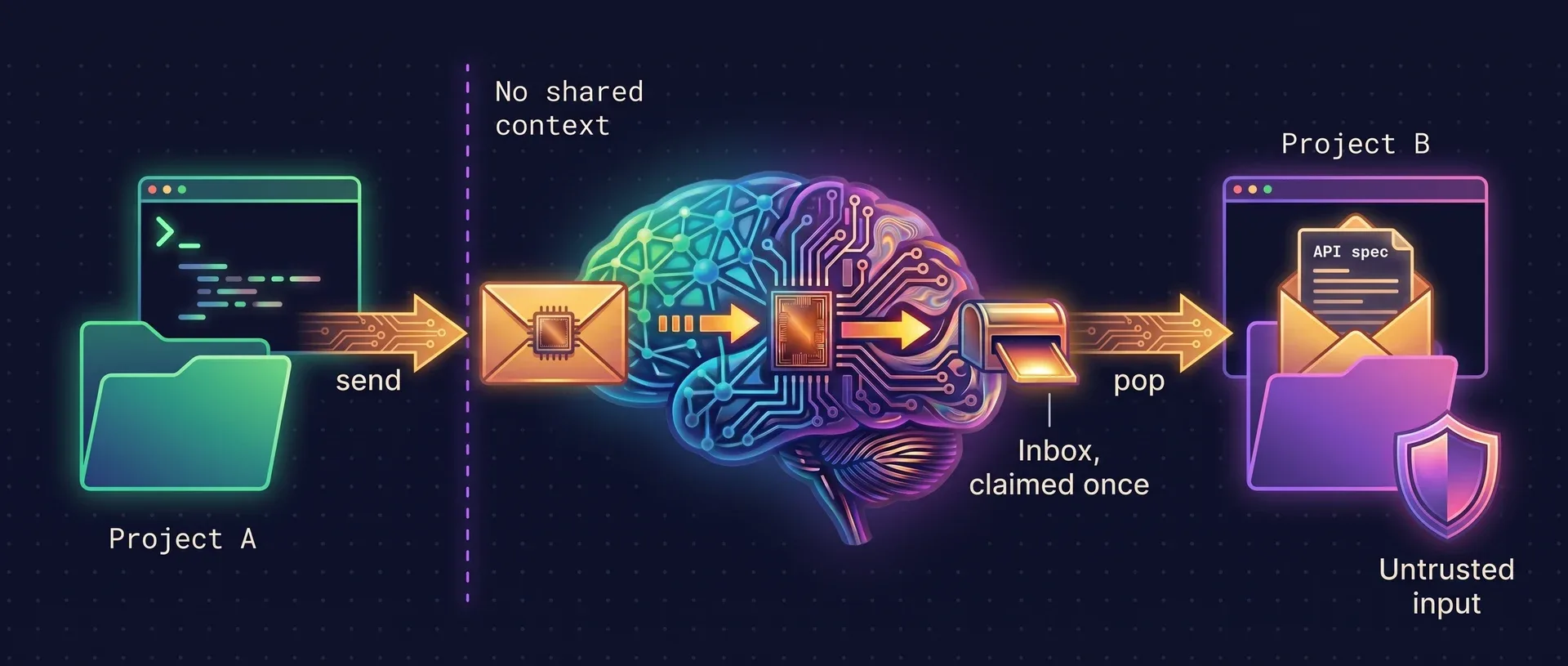
Two repositories that talk over an API, each with its own agent and its own memory. The frontend agent knows the protocol. Instead of reading the whole API repository, it writes a complete request and drops it in that project’s inbox.
What it looks like
In the frontend repository
> Ask the agent in default/api to add a /v1/export endpoint that streams NDJSON, keep the existing auth middleware, and send it through ai-memory.
The agent calls memory_message_send with a self-contained body. The request has to stand on its own, because the reader cannot see this project.
Later, in the API repository
📬 ai-memory: 1 cross-project message waiting in this project’s inbox.
> Check my ai-memory inbox.
The agent calls memory_message_pop, gets the request with who sent it, and works from it. A second pop returns nothing.
# Send from the current project
ai-memory message send --to-workspace default --to-project api \
    --subject "export endpoint" "Add a /v1/export endpoint that streams NDJSON…"

# In the other project: list without consuming, or claim the oldest
ai-memory message list
ai-memory message pop

# Change your mind before it is claimed
ai-memory message cancel --id <message-id>
Addressed to a project
A message goes to a workspace and project, and any session in that project can claim it. Once claimed, it is gone from the queue, like a handoff.
Nothing enters context by itself
The session start notice carries only a count. Message text reaches an agent through a deliberate pop, fenced and marked as untrusted, with the sender shown outside the fence.
Fails closed
The recipient project must exist, so a typo is rejected instead of landing in an inbox nobody reads. Each inbox holds at most 256 pending messages.
Retractable, audited
The sender can cancel a message until it is claimed. Secrets are scrubbed on send, the body is size-capped, and on a shared server every message records who sent it.
Keep clients, mono-repos and personal work apart
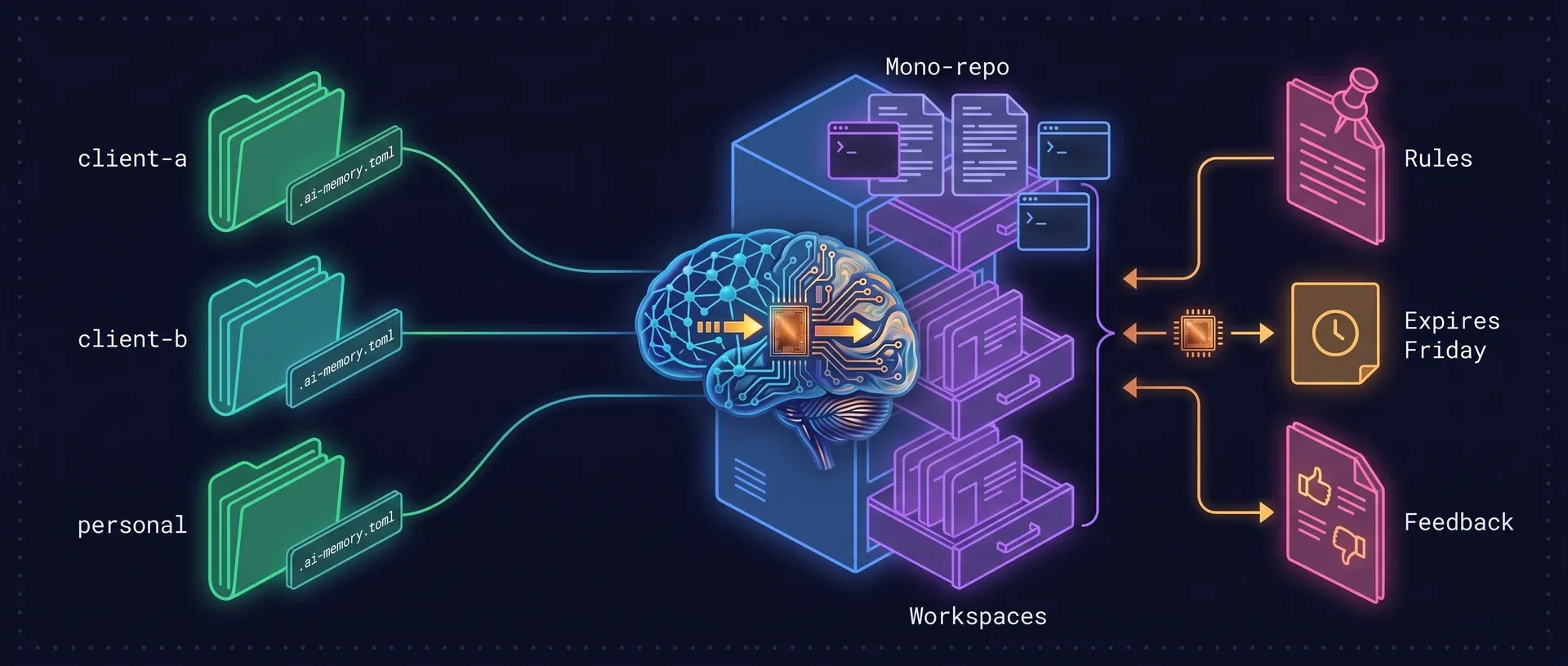
Memory is filed by workspace and project. A checkout with a git remote is filed by that remote, so the same repository cloned twice shares one memory, and a folder without a remote uses its name. A small file changes the rest.
One workspace per client
Drop
.ai-memory.tomlin~/work/client-a/and every repository below it files under that workspace. Nothing from client A ever surfaces while you work for client B.A mono-repo as one project
A marker that names a project pins every subdirectory to it, so packages share one memory. Leave the project out and each package keeps its own.
Git worktrees
Linked worktrees resolve to the main repository, so a branch checked out elsewhere keeps the same memory.
Two agents in one project
The current-project pointer is isolated per caller, so Claude Code and Codex can run side by side in the same directory without confusing each other.
One laptop, two employers
Register each server with
ai-memory server addand name it in the marker withserver = "team-b". Hooks from that tree go there and nowhere else, and a name that does not resolve sends nothing.Pin an identity
identity = "acme/platform"files a checkout under that key wherever it lives, even with no remote.
# Every repository under this directory files under the client-a workspace
workspace = "client-a"
Rules that reach every session
Tell the agent to remember something permanently and it becomes a page in the wiki. Rules are filed apart from facts, and the session brief can put them in front of the agent before the first prompt.
Say it once
“Remember: before touching the payment code, read the PCI notes.” The agent writes a durable page. Ask for it as a global rule and it applies to all your projects.
The brief carries them in
With
inject_on_session_start = truein the project’s marker file, pinned pages, rules and slots are prepended to every new session’s context.Lint suggests promotion
When a rule looks durable enough,
memory_lintsuggests copying it intoCLAUDE.mdorAGENTS.md. ai-memory never edits those files itself.Decision records stay yours
ai-memory never writes into your repository. Keep an ADR directory, and list it under
[capture] ignore_pathsso the wiki does not keep a stale copy of it.
# Prepend pinned pages, rules and slots to every session
[briefing]
inject_on_session_start = true
Notes that expire, and feedback that reorders
Remember this until Friday
A page written with
expires_atdrops out of search after that date. It is still there for a search that asks for expired pages.That page was wrong
memory_feedbackrecords helpful, not helpful, stale or wrong on a page. Stale and wrong lower it in future rankings and speed up its aging. Feedback never deletes.Move a session
A session captured in the wrong project, after a
cdinto a scratch directory, can be reattached withai-memory move-session. Its observations and page move with it.Recover from compaction
When Claude Code or Codex compact their context, a hook writes a fresh session page first, so what was compacted away can be recalled.
Read it in a browser, take it anywhere
A read-only web UI
Start the server with
--enable-weband every project’s pages are browsable, grouped into concepts, decisions, gotchas and sessions, with a JSON API under/api/v1.An open format
Each project is an Open Knowledge Format bundle.
ai-memory export-okfpackages it for any tool that reads OKF, and the files are plain markdown for everything else.Skills for your agent
ai-memory install-mcpalso installs a short routing snippet and managed Agent Skills, so the agent knows which tool answers “have we discussed this?” and which sends mail.
Chores the launcher takes on
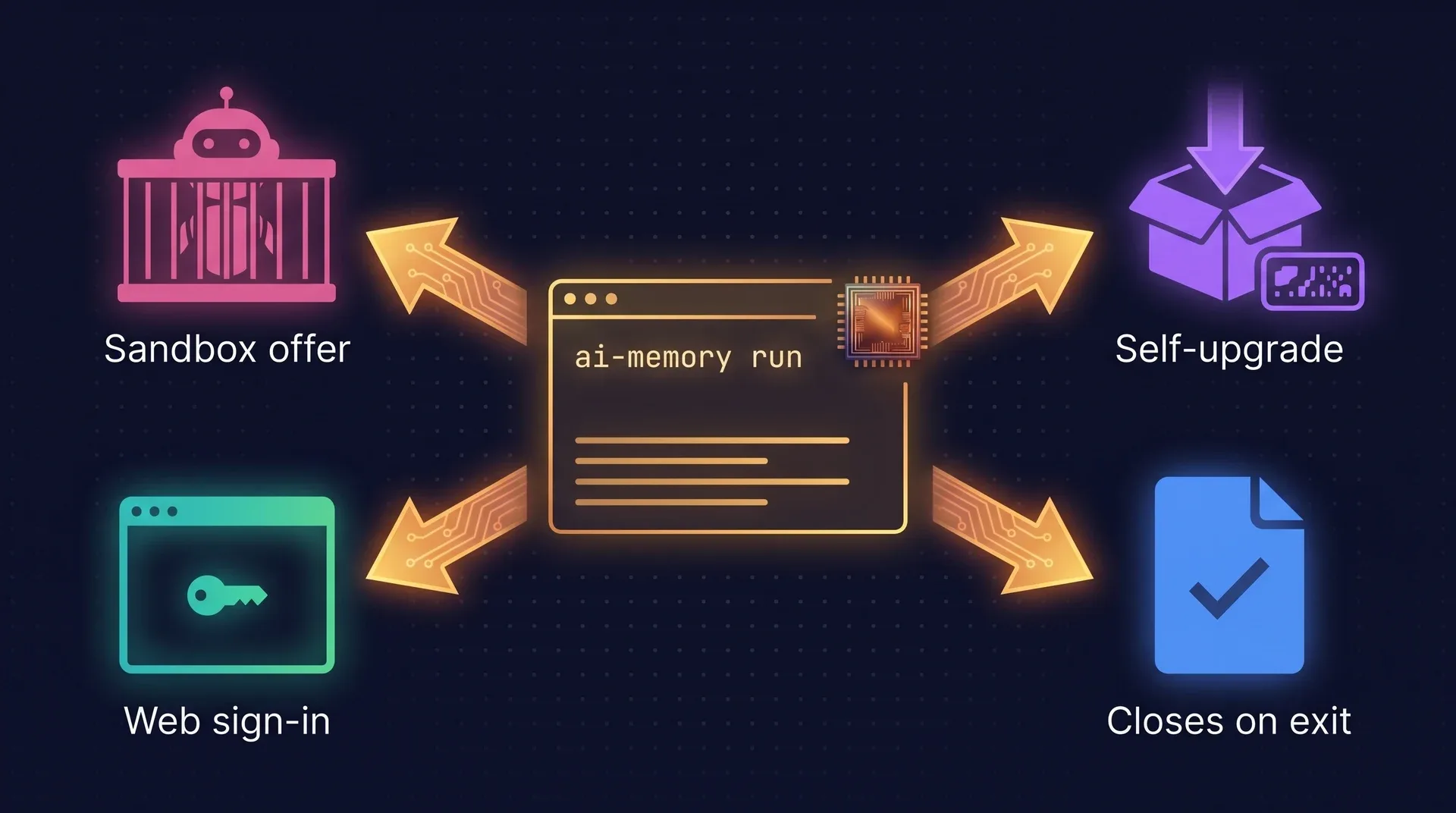
ai-memory run starts the agent through the memory server. It also keeps the binary current, closes sessions and says so before it disarms anything.
Upgrade in one command
ai-memory upgradedownloads the matching release, checks the checksum, swaps the binary and refreshes the hooks. Docker, Homebrew, AUR and RPM installs keep their own path.A warning before the guard rails come off
ai-jail on GitHubai-memory run --yolosays what it is about to disarm and, on Linux and macOS with ai-jail usable, offers to re-run the session inside the sandbox with a checklist of what the jail may see.--jailgoes straight in with sensible defaults.Environment for the harness
--env KEY=VALUEand--env-filereach the spawned agent and ai-memory’s own session lookup, so a per-accountCLAUDE_CONFIG_DIRneeds no wrapper script.Sessions close on exit
Agents with no session-end hook (Command Code, Kiro CLI, Antigravity CLI) get their summary and handoff when the launcher exits.
finalize-session --reopencovers a conversation that went on afterwards.Sign in to the web UI
The built-in wiki has login and change-password pages for password users, and a root-only page to approve or reject pending auto-improvement proposals across projects.
Stopwords in your language
[search.fts] stopwordslists the function words of your language, so full-text ranking on a Portuguese wiki is not skewed bydeandque.
Questions and answers
Can an agent in one project read another project’s memory?
No. Memory is filed per project, and messaging is the one deliberate crossing: a project sees only mail addressed to it or sent by it. The message body has to be self-contained because the reader cannot see the sender’s files.
Is a received message treated as instructions?
No. A popped message is fenced as untrusted cross-project input and carries a notice saying so. The agent evaluates it as a task request with you, and the sender is shown outside the fence so you can judge trust first.
What happens if two sessions check the same inbox?
The first pop claims the message and the second gets nothing. A message is claimed exactly once, the same rule handoffs follow.
Do I have to configure workspaces?
No. Without a marker file, everything files under a workspace called default, with the git remote as the project, or the directory name when there is none. Add .ai-memory.toml only when you want client separation, a mono-repo as one project, work and personal memory kept apart, or a second server.
Give your agents a memory today.
Free and open source under the MIT license. You need no account and no API key.